


Pinwheel Caregiver
3.5110.00 Reviews
App Specs
- Version
- 1.7.9
- Updated On
- License
- Free
- Downloads
- 10,000+
- Developer
- Pinwheel.com
- Categories
- Parenting
- Platform
- Android
Screenshots
 Analysis by AppCompare
I’d start with a small but important distinction: Pinwheel Caregiver is for adults managing a child’s Pinwheel smartphone, not a general-purpose family caregiving organizer. That focus makes it easier to judge what it is for. If you are responsible for a child’s Pinwheel phone and want a caregiver-facing place to manage it, it may fit naturally into your routine. If you are looking for a shared medical calendar, a caregiver community, or a tool for coordinating care across relatives, I would look elsewhere rather than assume those functions are part of this app.
A focused companion for a child’s phone
The app is a free parenting tool from Pinwheel.com, built around the relationship between a caregiver and a child’s Pinwheel smartphone. I find that narrower purpose more useful than a broad promise to solve every family problem: it tells you the app belongs in the phone-management part of parenting, not necessarily in a calendar or health-care workflow. The content rating is Everyone, and the app has more than ten thousand installs. Its average rating is 3.2 from around two hundred ratings, a mixed response that suggests it is worth judging by whether it matches your household’s setup and needs rather than by assuming it will work for every family.
That distinction also matters when deciding what to install. A child’s phone can raise practical questions that ordinary family messaging does not address, while a caregiver portal only helps if the child is using the associated Pinwheel device. I would first confirm that this is the phone-management relationship I need; the name alone could otherwise sound like an app for adult care duties.
Where it fits in a family’s routine
In everyday use, I would treat the portal as a caregiver’s point of reference for managing the child’s Pinwheel phone, rather than as a replacement for talking with the child about expectations. For example, before a school day, a caregiver might use the phone-management setup to keep oversight in the adult’s hands while the child carries a device. That can be a more deliberate middle ground than handing over an unrestricted phone or trying to manage everything through casual reminders.
For a household with two caregivers, the practical question is how each adult will handle responsibility: who checks the phone setup, who responds when the child needs help, and how changes are agreed on. A portal may support that kind of oversight, but families should decide on their own routine instead of assuming an app automatically creates shared understanding. I’d keep expectations simple and explain to the child what adults manage and why.
Getting Started with Pinwheel Caregiver
First things first, setting up Pinwheel Caregiver is a breeze. Available on both Android and iOS, downloading and installing the app is straightforward. Once you’ve got it on your device, you'll be prompted to create an account. The interface is clean and intuitive, which is always a relief when you’re already dealing with a hectic schedule.
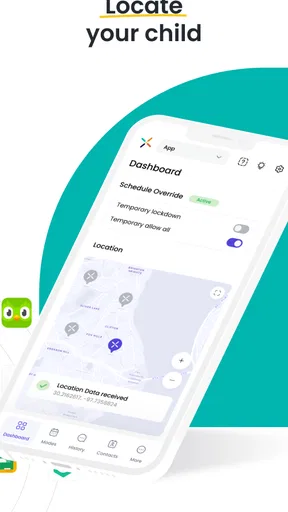
After logging in, you're greeted with a dashboard that feels like a breath of fresh air. It's organized, easy to navigate, and doesn't bombard you with information overload. The app is designed to make your life easier, not more complicated.
Worth Reading Before You Choose

EA SPORTS FC Mobile 26 Is a Bigger Football Game, but It Takes Time

Flipboard Shows What News Apps Must Do Beyond the Feed

Switching to Android Auto Means Rethinking Your Driving Routine

Google Calendar Makes a Crowded Week Easier to Manage

Ludo King Makes the Most of the Minutes Between Plans

Baby Panda World Brings Quick Play to Modern Phones, but Its Game Library Feels Busy
Features That Stand Out
One of the standout features of the app is its scheduling capability. You can effortlessly manage appointments, set reminders, and even get alerts for medications. It's like having a personal assistant in your pocket. Imagine never missing a doctor's visit or forgetting a medication time again. Pretty sweet, right?
Another nifty feature is the communication tools. Whether you need to send a quick update to family members or coordinate with healthcare providers, the app makes it seamless. You can send messages, share updates, and even keep everyone in the loop with a shared calendar.
For those who are tech-savvy, the app also integrates with other devices. Syncing it with your smart home devices or wearables can take your caregiving game to the next level. Tracking vitals or setting up alerts has never been easier.
Why It’s a Game-Changer
What really sets Pinwheel Caregiver apart is the community aspect. The app offers a platform to connect with other caregivers, share experiences, and offer support. It’s like having a support group in your pocket. This feature is a lifesaver, especially for those days when you feel like you’re going it alone.
The app also provides educational resources. Whether you're a seasoned caregiver or new to the role, having access to tips, articles, and expert advice can be incredibly empowering. It’s like having a caregiving coach available 24/7.
Room for Improvement?
While the app is pretty fantastic, no app is perfect. Some users might find the lack of offline capabilities a bit of a bummer. Also, while the interface is generally user-friendly, there’s always room for tweaks and enhancements, especially for those who might not be as tech-savvy.
However, the developers seem committed to regular updates, which means any kinks will likely be ironed out with time. The feedback feature within the app is a nice touch, allowing users to voice their thoughts and suggestions.
Checking fit before relying on it
Because a caregiver portal is only useful when it corresponds to the child’s phone, I would make the device relationship the first check, not the last. Before building a routine around the app, confirm that the child has the relevant Pinwheel smartphone and that the caregiver account can be used for the adult who needs access. This avoids the frustrating scenario of downloading a well-reviewed-in-principle tool only to discover it does not serve a family using a different phone arrangement.
It is also sensible to decide what “management” means in your home. Some parents want a way to oversee a child’s device; others mainly need a quick communication channel, or a shared system for appointments and medicines. Those are different jobs. I would not choose this app as a substitute for a health organizer or family calendar unless those specific tasks are confirmed to be part of the experience you need. For medical schedules, keep using a dependable calendar or care tool that your whole team already understands.
How it compares with familiar alternatives
Compared with a standard calendar app, a caregiver portal is a more specific choice: a calendar can coordinate school events and appointments across many kinds of devices, but it does not by itself manage a child’s Pinwheel phone. Conversely, the dedicated portal is not the obvious pick for a family whose main challenge is sharing a household schedule across iPhones, Android phones, and relatives who do not use Pinwheel. The best option depends on the task, not on which app has the broadest-sounding promise.
Parental-control tools are another comparison point, but I would not treat them as interchangeable. A general device-control app may suit a family looking to manage phones from different manufacturers; Pinwheel Caregiver makes most sense when the child’s phone is part of the Pinwheel setup. That specialization can reduce the need to adapt a generic tool, but it also narrows the audience. If your child switches to a different phone ecosystem, or you need one control panel for several brands, a cross-platform alternative may be more practical.
Small habits that make oversight clearer
One useful approach is to check the phone-management setup at a calm time rather than only when something goes wrong. For instance, a caregiver could review the arrangement before the start of a school week, then discuss any expectations with the child while there is time to make adjustments. This turns the portal into part of a predictable routine instead of a tool that appears only during conflict. It also gives adults a chance to catch misunderstandings before a busy morning.
In a two-adult household, I would agree on who is responsible for routine checks and how the other caregiver will be kept in the loop. Duplicating every action can create confusion, while leaving ownership unstated can mean nobody checks. Even a simple agreement about who handles ordinary oversight and who steps in when that person is unavailable can make a dedicated portal more useful. The app can support a family’s process, but it cannot decide that process for you.
There is a trade-off here: closer oversight may reassure adults, but it can also feel intrusive to a child if expectations are never explained. I would pair device management with an age-appropriate conversation about safety and responsibility. That is not a feature of the app; it is the human part of using any parental phone tool well. If your priority is building trust through discussion rather than managing a child’s device, a portal may play only a small role in your approach.
What to expect from the current version
The app’s current version is 1.6.2, and its release date was May 26, 2021. Those details give a useful snapshot of its product history, but they do not tell me what changed between releases or which parts of the experience have recently been improved. I would avoid treating a version number as proof of a particular feature or assuming that an older release date means the app is no longer useful. What matters most is whether the current experience works with the child’s Pinwheel phone and with the adult’s device.
For an existing user, a sensible habit is to keep the app updated through the device’s normal app-update process and then check that the caregiver can still perform the tasks the family relies on. If a change in behavior appears after an update, verify the setup before changing the household routine. That is practical advice for a phone-management tool: an adult should not assume oversight is working simply because the app remains installed.
The wider lesson is to separate what is established from what you hope will arrive next. The app has a defined role as a caregiver portal for a child’s Pinwheel smartphone; future refinements may make that role smoother, but I would not make a decision based on imagined additions. If you are considering it for a new family setup, test the core caregiver workflow first and keep a fallback plan for essential communication until you are confident it fits.
Who is likely to appreciate it
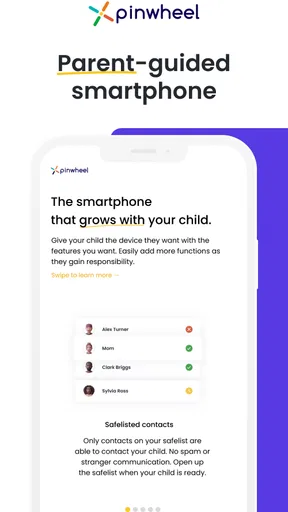
I’d consider it for a parent or guardian who already uses a Pinwheel phone for a child and wants a dedicated caregiver-facing way to manage that arrangement. It may also suit adults who prefer a focused tool over trying to coordinate device oversight through general chat messages. The clearest benefit is contextual: the app belongs to a particular child-phone setup, so it can be more relevant than a broad family organizer when that is exactly what the household uses.
I would skip it if the child does not have a Pinwheel smartphone, if you need a shared care calendar for an adult relative, or if your priority is a universal parental-control dashboard for several phone brands. I would also hesitate if your family expects every caregiver to use a different platform and needs broad cross-service coordination. In those cases, a general calendar, a family communication app, or a device-management option built for mixed phones may be a better starting point.
What I would check before depending on it
A natural question is whether this app is for the person carrying the phone or for the adult responsible for it. Its purpose is the caregiver side of managing a child’s Pinwheel smartphone, so I would install it on the caregiver’s device and make sure the child’s phone is part of the matching setup. That distinction helps avoid confusing it with a child-facing messaging or entertainment app.
Another practical question is whether it can replace every other family tool. I would not plan on that. A device portal and a family calendar solve different problems, and a care team may still need its existing methods for appointments or health information. Similarly, if several adults need access, decide how they will share responsibility rather than assuming that installing the app alone will coordinate them.
Pinwheel Caregiver is free, which makes it reasonable to evaluate when the household already uses the matching phone. But “free” does not mean it is automatically the right fit: setup time, compatibility with your routine, and confidence in the management workflow matter more. I would try it against one clear everyday need first, such as keeping adult oversight organized before a school day, then decide whether it deserves a permanent place in the family’s routine.
Final Thoughts
All in all, Pinwheel Caregiver is a solid choice for anyone in the caregiving community. It offers a robust suite of features that can genuinely make life easier. From scheduling and communication to community support and educational resources, it’s got a little bit of everything.
If you’re a caregiver, I’d highly recommend giving it a shot. It might just become your new indispensable tool. And let’s face it, anything that can make caregiving a little bit easier is worth its weight in gold.
So, go ahead and download Pinwheel Caregiver today. Your future self will thank you!
Pros
- User-friendly interface for all ages.
- Real-time location tracking feature.
- Customizable alerts and notifications.
- Secure communication channels.
- Battery life optimization options.
Cons
- Limited device compatibility.
- No offline mode available.
- Requires constant internet connection.
- Subscription required for full features.
- Limited customization for user interface.
FAQs for Pinwheel Caregiver
What is Pinwheel Caregiver and who is it for?
Pinwheel Caregiver is a comprehensive app designed for parents and guardians to manage and monitor their child's smartphone usage. It provides tools to set healthy limits, monitor activity, and ensure safe browsing. It's ideal for anyone looking to create a safe digital environment for children while fostering independence.
How does Pinwheel Caregiver ensure my child's online safety?
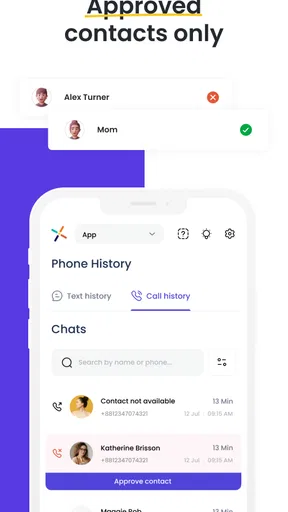
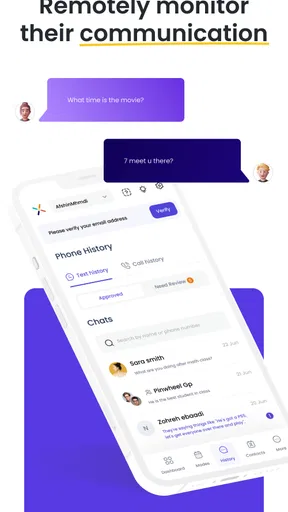
Pinwheel Caregiver offers robust safety features including content filtering, app approval processes, and real-time monitoring of app usage and communications. Parents can customize settings to block inappropriate content and receive alerts about potential safety concerns, ensuring a secure online experience for kids.
What devices are compatible with Pinwheel Caregiver?
Pinwheel Caregiver is compatible with both Android and iOS devices. It seamlessly integrates with a wide range of smartphones, allowing parents to manage settings remotely from their own device. Ensure your device meets the app’s minimum operating system requirements for optimal performance.
Can I control which apps my child can access?
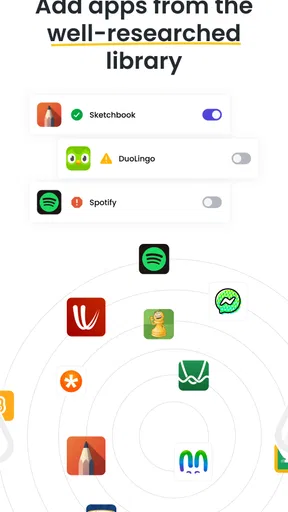
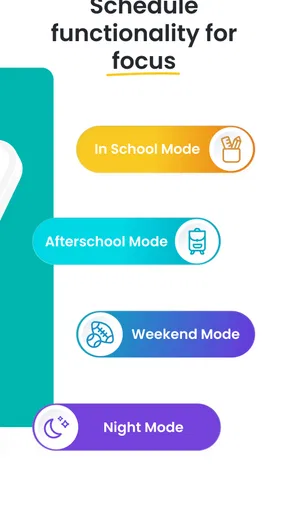
Yes, Pinwheel Caregiver allows you to control which apps your child can access. You can approve or block apps, set time limits, and even schedule when certain apps can be used. This gives you the flexibility to manage your child’s screen time effectively and encourage healthy digital habits.
Is there a subscription fee for Pinwheel Caregiver?
Pinwheel Caregiver operates on a subscription-based model, offering various plans to suit different needs. These plans provide access to a range of features, including advanced monitoring and detailed reports. Check their website for current pricing and plan details to find the best option for your family.


